Verbeterde AI-herkenning, BTW-codes bij regelherkenning en meer verbeteringen
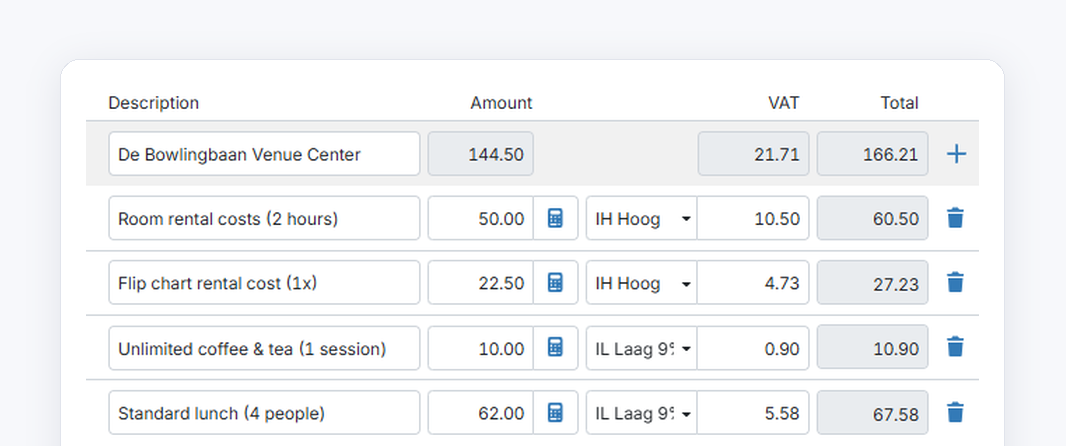
In this update, TriFact365 recognises amounts and contacts even better. We have also made a number of small improvements to the check screen and to connections.
Improved AI recognition
Amounts. Amount fields such as Amount, VAT and Total are recognised more accurately.
New contacts for sales invoices. For sales invoices, TriFact365 now suggests a new contact more often if one does not exist yet. More fields are also filled in for you in these suggestions.
Existing contacts. Existing contacts are recognised more accurately for both purchase and sales invoices.
Contact’s VAT code applied with multiple entry lines
Previously, TriFact365 only applied the contact’s VAT code if the entry proposal consisted of a single entry line.
From now on, this also happens for entry proposals with multiple entry lines, if automatic line recognition is switched on.
TriFact365 fills in the contact’s VAT code on every entry line where the VAT percentage matches that of the VAT code.
Set the height of the PDF viewer
Do you have the entry lines below the document in the check screen? You can now also adjust the height of the PDF viewer, so you see exactly as much of the document and the entry lines as you want.
Bug fixes
Text copied from the PDF in the check screen could not be pasted into the Payment reference field. (FIXED)
After renewing a connection, it was not reset to Active. (FIXED)